articles
Thanks!

This is the second part of sysinfo: retrieving process GPU usage information. I mentioned in the previous blog post that implementing the "process GPU usage" feature on Linux in the sysinfo crate had a huge impact on performance and that I spent two months on fixing it. Let's see why and how.
Oh also before I forget: the 0.40.0 version of sysinfo with this new GPU feature and much more was released a few hours ago. Take a look at the CHANGELOG if you're interested!
Before we start diving into this, I need to precise: I'm in no way an expert in optimization. I discovered all I'll present here as I went through this journey. One great resource I used was the Rust Performance Book written by Nicholas Nethercote. It's been incredibly useful so thanks a lot for writing it!
⚠️ Because the load on the system can change, I'll always show performance results between the two binaries I want to compare.
Before I merged #1718, I already spent some time trying to reduce the performance regression. Instead of reading all files from the fdinfo folder, I realized that GPU-related files path were starting either with /dev/dri/ or with /dev/accel/. As reminder, fdinfo and fd contain the same files, except that fdinfo contains information about the fd files. However, reading a file is slow, so filtering which files we actually need to read will help. To do so, I used readlink on the fd files and only kept the ones matching the two paths.
I wrote this code I used as bencher to keep track of my progress in my performance optimization attempts. It retrieves all processes with all their associated information:
Runuse sysinfo::{ProcessRefreshKind, ProcessesToUpdate, System};

fn main() {
    let mut sys = System::new().unwrap();
    sys.refresh_processes_specifics(
        ProcessesToUpdate::All,
        false,
        ProcessRefreshKind::everything()
    );
    // We display the number of processes retrieved to give a rough idea of
    // how much time/instructions it took per process.
    println!("nb processes: {}", sys.processes().len());
}
And I used this python script to run perf a few times and then compute the median (yes it's ugly, but if it works...):
import sys
import subprocess
import re
import time
import math
import statistics

def main():
    if len(sys.argv) < 2:
        print(f"Usage: python {sys.argv[0]} <path_to_binary>")
        sys.exit(1)

    binary_path = sys.argv[1]
    ratios = []
    times_elapsed = []

    print(f"Running 'perf stat -e instructions {binary_path}' 10 times...")

    for i in range(10):
        result = subprocess.run(
            ["perf", "stat", binary_path],
            stdout=subprocess.PIPE,
            stderr=subprocess.PIPE,
            text=True
        )

        stdout_lines = result.stdout.strip().splitlines()
        binary_number = int(stdout_lines[0].split(':')[-1].strip())
        match = re.search(r"([\d,]+)\s+instructions", result.stderr)
        if not match:
            continue

        instructions_str = match.group(1).replace(",", "")
        instructions_u = int(instructions_str)

        time_match = re.search(r"([\d.,]+)\s+seconds time elapsed", result.stderr)
        time_str = time_match.group(1).replace(",", "")

        time_elapsed = float(time_str)

        ratio = math.ceil(instructions_u / binary_number)
        ratios.append(ratio)
        times_elapsed.append(time_elapsed)

        print(f"Run {i + 1}: {instructions_u} / {binary_number} = {ratio} instructions per process")
        print(f"Run {i + 1}: {time_elapsed} seconds")

        if i < 9:
            time.sleep(0.5)

    med = statistics.median(ratios)
    final_result = math.ceil(med)

    time_median = statistics.median(times_elapsed)

    print("\n--- Results Summary ---")
    print(f"Median instructions per process: {final_result}")
    print(f"Median run time: {time_median}")

if _name_ == "_main_":
    main()
So without the readlink filtering:
$ perf stat -e instructions ./no-filter
nb processes: 1829

Performance counter stats for './no-filter':

   24,298,834,017      instructions

      2.413956046 seconds time elapsed

      0.073720000 seconds user
      2.332705000 seconds sys
With it:
$ perf stat -e instructions ./filter
nb processes: 1871

Performance counter stats for './filter':

    2,131,000,470      instructions

      0.442752139 seconds time elapsed

      0.056830000 seconds user
      0.381652000 seconds sys
Looking at seconds time elapsed, we can see that without the filtering, it's 5 times slower. So yes, big +1 for the filtering. But with the filtering, how much slower is it compared to before we added the "gpu" feature?
$ perf stat -e instructions ./before-gpu
nb processes: 1860

Performance counter stats for './before-gpu':

      514,120,617      instructions

      0.107879757 seconds time elapsed

      0.025841000 seconds user
      0.081499000 seconds sys
The new "gpu" feature is 4.4 times slower! Let's generate a flamegraph to see if something stands out.
To do so, I used flamegraph-rs. Also, to get better flamegraph, I used RUSTFLAGS="-C force-frame-pointers=yes -C symbol-mangling-version=v0" (provided in the Rust Performance Book) when compiling the binary. Once flamegraph-rs installed, you can run it on the new binary with:
$ flamegraph -- ./filterThis is what we get:
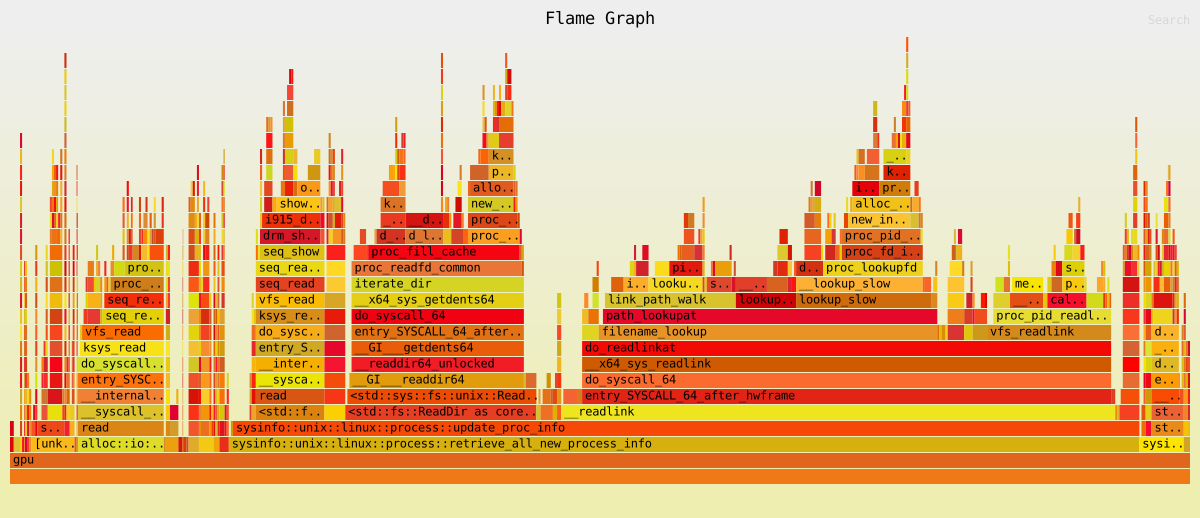
Taking a quick look, we can see that the program spends 49% of time in _readlink. Sadly, apart from calling it less often, there is not much we can do... However, we have another interesting case: <std::fs::ReadDir as core::iter::traits::iterator::Iterator>::next. It takes around 16% of the total time.
Under the hood, Rust's ReadDir uses (on Linux at least) the readdir function. However in the flamegraph, this function calls a lot of others. So out of curiosity, I took a look at the next one in the stack: getdents64, which looks like this:
int getdents64(unsigned int fd, struct linux_dirent *dirp, unsigned int count);First argument, fd, is the folder we want to read, the second argument is a pointer to the data about the entries in the folder. And the third is... how many entries we want at once?! And even more interesting: the readdir function seems to always pass 1 as count. What happens we use 20 instead?
Old code for comparison:
$ perf stat -e instructions ./old-code
nb processes: 1788

Performance counter stats for './old-code':

      480,973,198      instructions

      0.103081160 seconds time elapsed

      0.021772000 seconds user
      0.080250000 seconds sys
And here's the new code:
$ perf stat -e instructions ./new-code
nb processes: 1783

Performance counter stats for './new-code':

    1,488,846,897      instructions

      0.348563389 seconds time elapsed

      0.032709000 seconds user
      0.310122000 seconds sys
So we're now 3.5 times slower instead of 4. Quite a good start already. Interestingly enough, we increased the number of instructions. Modifying how we read the folders forced me to open them and keep their file descriptor. But now we have to keep the folder's fd around. Would be nice to use it for opening other files, right? So I replaced readlink and open with the readlinkat and openat equivalents whenever possible. It allowed to remove some paths concatenation (no need to concatenate the parent's path with the file we want to open anymore), leading to the result above.
Now we have this flamegraph:
It was done in #1719.
So we now have this flamgraph:
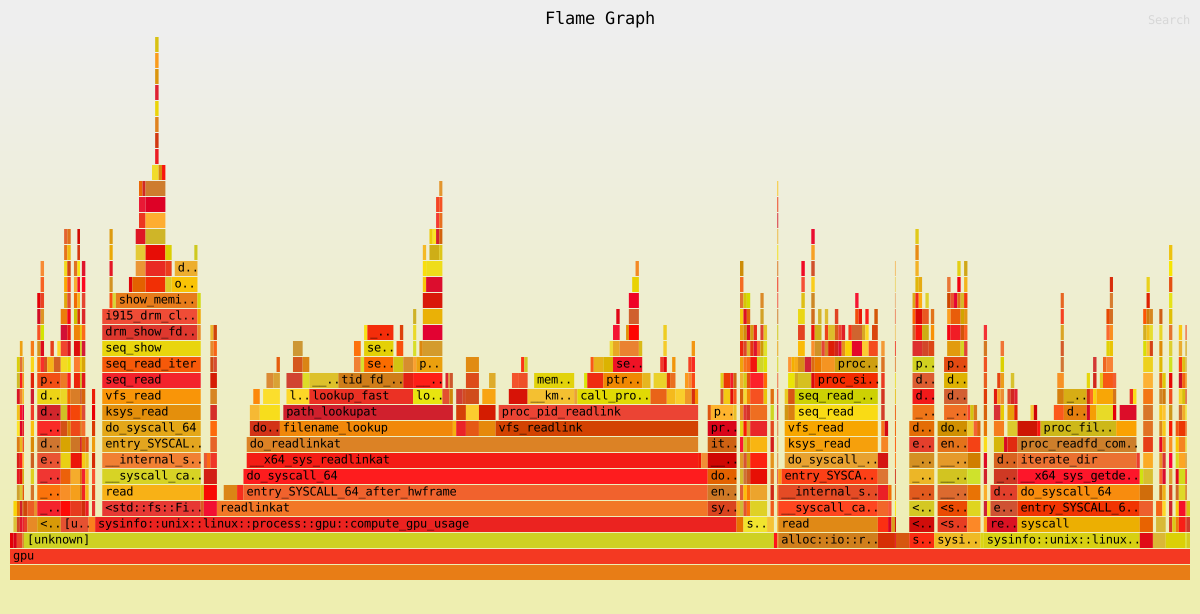
The compute_gpu_usage functions takes a bit more than 50% of the total time. However, I'm out of ideas on how to make it faster. So the idea now is to remove times from everywhere else in hope I'll be able to make it go down enough to compensate for the GPU performance regression.
One thing sysinfo does a lot is manipulating &str, even though it could be &[u8]. So I replaced a few of them in #1720. I also updated the little program I use to exclude the GPU refresh:
Runuse sysinfo::{ProcessRefreshKind, ProcessesToUpdate, System};

fn main() {
    let mut sys = System::new().unwrap();
    sys.refresh_processes_specifics(
        ProcessesToUpdate::All,
        false,
        ProcessRefreshKind::everything()
            // We remove refresh of GPU-related information.
            .without_gpu_memory()
            .without_gpu_usage()
    );
    // We display the number of processes retrieved to give a rough idea of
    // how much time/instructions it took per process.
    println!("nb processes: {}", sys.processes().len());
}
Before #1720 it gives:
$ perf stat -e instructions ./before-PR
nb processes: 2095

Performance counter stats for './before-PR':

       61,010,201      instructions:u

      0.394211446 seconds time elapsed

      0.022908000 seconds user
      0.366444000 seconds sys
And after:
$ perf stat -e instructions ./after-PR
nb processes: 2099

Performance counter stats for './gpu-with-stat-file':

       48,441,889      instructions:u

      0.372936467 seconds time elapsed

      0.019952000 seconds user
      0.348065000 seconds sys
Around 20% less instructions, not too bad!
Now let's take a look at the parse_stat_file function in particular. This function parses the /proc/{PID}/stat files which look like this:
1 (blob) S 2 0 0 0 -1 2129984 0 0 0 0 14 28 0 0 20 0 1 0 21 66 77To know what each field value is representing, take a look at the proc_stat manual. Annoying thing to know about this file: fields are whitespace separated. But the command name (in the parens) can also contain whitespace characters. So even if you are only interested by the nth first values (which is the case of sysinfo), you still need to get the whole content and split it on ) by starting from the end. Then you can split all values after the ) by splitting on whitespace characters.
Another small anecdote about this file and the command name. Quoting the manual:
The filename of the executable, in parentheses.
Strings longer thanTASK_COMM_LEN(16) characters
(including the terminating null byte) are silently
truncated. This is visible whether or not the
executable is swapped out.
Well, strings longer than TASK_COMM_LEN are NOT truncated. And yes, it was a "fun" debug session. :')
Back to the parse_stat_file function. Before #1721, I stored all values used later inside a Vec. I wondered if storing each value in the expected type in a struct would be faster. So I created:
Runstruct Parts<'a> {
    short_exe: &'a [u8],
    status: ProcessStatus,
    parent_pid: Option<&'a [u8]>,
    flags: Option<&'a [u8]>,
    user_time: u64,
    system_time: u64,
    start_time: u64,
    virtual_size: Option<&'a [u8]>,
    resident_set_size: Option<&'a [u8]>,
}
Before the change:
$ perf stat -e instructions ./before-PR
nb processes: 2074

Performance counter stats for './before-PR':

       48,368,333      instructions:u

      0.361854460 seconds time elapsed

      0.014963000 seconds user
      0.342174000 seconds sys
and with it:
$ perf stat -e instructions ./after-PR
nb processes: 2074

Performance counter stats for './after-PR':

       45,343,230      instructions:u

      0.343208889 seconds time elapsed

      0.019976000 seconds user
      0.318703000 seconds sys
Which gives a difference of around 6%. Not really decisive but I find the new code better and easier to read, so keeping it!
Then I did the same thing with the get_uid_and_gid function. It parses the /proc/{PID}/status file, which looks like this:
Name:   bash
Umask:  0022
State:  S (sleeping)
Tgid:   123543
Ngid:   0
Pid:    123543
PPid:   24749
Uid:    1000    1000    1000    1000
Gid:    1000    1000    1000    1000
Four values for Uid and Gid. From the proc_pid_status manual:
Real, effective, saved set, and filesystem UIDs (GIDs).
We're only interested in the two first values, so just a split and we're done.
This time there is already an existing bench in sysinfo code so running it gives:
test bench_get_uid_and_gid_new     ... bench:    122.03 ns/iter (+/- 2.29)
test bench_get_uid_and_gid_old     ... bench:    235.74 ns/iter (+/- 4.88)
Almost 50% less time to run the same code, nice. Although, overall the gain is barely noticeable considering this function is rarely called.
As my despair grows deeper and less and less functions are standing out, I took a look at the split_content function. It's used to split content (haha) for things like /proc/{PID}/cmdline or /proc/{PID}/environ which are strings separated by \0. The function is 16 lines of code. In #1734, I simplified it and it's now 8 lines of code. The original code was trying to be too smart and had 3 if conditions while also playing with subslices. The new one uses an iterator with one if to skip empty strings and that's it.
You can see the bench code I used to compare old and new version in the function here:
Runuse std::os::unix::ffi::OsStrExt;
use std::ffi::{OsStr, OsString};
use std::hint::black_box;

fn split_content_new(data: &[u8]) -> Vec<OsString> {
    let mut out = Vec::with_capacity(10);
    for part in data.split(|c| *c == 0) {
        if !part.is_empty() {
            out.push(OsStr::from_bytes(part).to_os_string());
        }
    }
    out
}

fn split_content_old(mut data: &[u8]) -> Vec<OsString> {
    let mut out = Vec::with_capacity(10);
    while let Some(pos) = data.iter().position(|c| *c == 0) {
        let s = &data[..pos].trim_ascii();
        if !s.is_empty() {
            out.push(OsStr::from_bytes(s).to_os_string());
        }
        data = &data[pos + 1..];
    }
    if !data.is_empty() {
        let s = data.trim_ascii();
        if !s.is_empty() {
            out.push(OsStr::from_bytes(s).to_os_string());
        }
    }
    out
}

#[bench]
fn bench_split_new(b: &mut test::Bencher) {
    b.iter(|| {
         black_box(split_content_new(b"a\0b\0c\0d\0e\0f\0g\0h\0i\0j\0k\0l\0m\0n\0o"));
    });
}

#[bench]
fn bench_split_old(b: &mut test::Bencher) {
    b.iter(|| {
         black_box(split_content_old(b"a\0b\0c\0d\0e\0f\0g\0h\0i\0j\0k\0l\0m\0n\0o"));
    });
}
Results:
running 2 tests
test bench_split_new       ... bench:      330.19 ns/iter (+/- 10.64)
test bench_split_old       ... bench:      361.64 ns/iter (+/- 14.69)
Almost 9% improvement... on a very small benchmark on code that isn't used that often. Did I mention already that I was out of idea?
I noticed that the /proc/{PID}/status file could be read more than once per process if the process was a task. So instead, in #1739, I created a new type (named Ids) holding the information and passing an Option<Ids> to the refresh functions. If None, then we get information from /proc/{PID}/status, otherwise we just use what we already have. Which gives:
$ perf stat -e instructions ./multiple-status-reads
nb processes: 1913

Performance counter stats for './multiple-status-reads':

    1,613,395,055      instructions

      0.383457319 seconds time elapsed

      0.027907000 seconds user
      0.351794000 seconds sys
and with the patch:
$ perf stat -e instructions ./unique-status-read
nb processes: 1914

Performance counter stats for './unique-status-read':

    1,591,405,535      instructions

      0.377153739 seconds time elapsed

      0.034760000 seconds user
      0.338622000 seconds sys
1.4% of change. I think it's just noise. I was hoping it'd be more.
I mentioned that I took at how readdir worked under the hood. But I'm ashamed to say that I didn't think about doing the same with readlink. However 0x1sma1l did exactly that and came up with #1749. Instead of checking where the fd is pointing to by doing string comparison, we use fstatat to check what the device actually is by checking its flags.
$ perf stat -e instructions ./without-fstatat
nb processes: 1913

Performance counter stats for './without-fstatat':

    1,620,079,931      instructions

      0.378355383 seconds time elapsed

      0.029768000 seconds user
      0.344317000 seconds sys
And with the new changes:
$ perf stat -e instructions ./fstatat
nb processes: 1913

Performance counter stats for './fstatat':

    1,489,802,708      instructions

      0.325040912 seconds time elapsed

      0.032143000 seconds user
      0.289258000 seconds sys
So around 8% performance improvement. Slowly but surely, we're getting there! Congrats to 0x1sma1l once again!
OK, lesson learned. Always take a look at the C function to see if we can remove some layers. Let's do that with fstatat. Under the hood, it calls the statx function. It's quite interesting: it takes a pointer to a statx struct, but only fills the fields based on the mask you give it. And fstatat gives more than what sysinfo needs. So I called statx directly with only the bare minimum of what we need in #1755. Wrote this benchmark (put in src/unix/linux/process.rs at the same level as the gpu handling code):
Runextern crate test;

#[bench]
fn bench_gpu(b: &mut test::Bencher) {
    // `17169` is a process (firefox in my case) which is using GPU.
    // Replace it with a PID using GPU on your own computer.
    let mut p = PathHandler::new("/proc/17169");
    let mut gpu = GpuInfo::default();
    let now = Instant::now();
    let refresh_kind = ProcessRefreshKind::everything();

    b.iter(|| {
        compute_gpu_usage(&mut p, &mut gpu, now, refresh_kind);
    });
}
Which gave this result before the changes:
test unix::linux::process::gpu::bench_gpu ... bench: 701,606.12 ns/iter (+/- 3,879.62)and after:
test unix::linux::process::gpu::bench_gpu ... bench: 690,902.90 ns/iter (+/- 4,304.63)So 1.5% of improvement. Mostly noise once again I guess. So sadly, this didn't bring the improvement I hoped.
Although reducing memory allocations might lead to performance improvement, it's much less obvious and strongly depends on the allocator. In #1756, it led to no performance improvements, but at least it greatly reduced the total memory allocated and also reduced the number of allocator calls. This is a follow-up of #1721.
So the idea is: when we refresh processes, we always read the same files and parse the same data. So instead of reallocating everything for each process and each file, we could instead reuse the allocated memory. So that's what I did: I created a new type where I stored the allocated content:
PathBuf for concatenating paths.getdents64.If you wonder why I need a separate buffer for getdents64 instead of reusing the buffer used for file reading, the answer is that we need to read files while using the data in the getdents64 buffer. So two buffers.
As mentioned, there is no difference in either instructions or run time. However when using valgrind, we get very interesting results.
Before the #1756:
$ valgrind ./before-mem-opti
nb processes retrieved: 2435
==2908601==
==2908601== HEAP SUMMARY:
==2908601==     in use at exit: 548 bytes in 2 blocks
==2908601==   total heap usage: 205,755 allocs, 205,753 frees, 192,068,498 bytes allocated
==2908601==
==2908601== LEAK SUMMARY:
==2908601==    definitely lost: 0 bytes in 0 blocks
==2908601==    indirectly lost: 0 bytes in 0 blocks
==2908601==      possibly lost: 0 bytes in 0 blocks
==2908601==    still reachable: 548 bytes in 2 blocks
==2908601==         suppressed: 0 bytes in 0 blocks
==2908601== Rerun with --leak-check=full to see details of leaked memory
==2908601==
==2908601== For lists of detected and suppressed errors, rerun with: -s
==2908601== ERROR SUMMARY: 0 errors from 0 contexts (suppressed: 0 from 0)
With #1756:
$ valgrind ./with-mem-opti
nb processes retrieved: 2432
==2908604==
==2908604== HEAP SUMMARY:
==2908604==     in use at exit: 544 bytes in 1 blocks
==2908604==   total heap usage: 169,911 allocs, 169,910 frees, 39,452,116 bytes allocated
==2908604==
==2908604== LEAK SUMMARY:
==2908604==    definitely lost: 0 bytes in 0 blocks
==2908604==    indirectly lost: 0 bytes in 0 blocks
==2908604==      possibly lost: 0 bytes in 0 blocks
==2908604==    still reachable: 544 bytes in 1 blocks
==2908604==         suppressed: 0 bytes in 0 blocks
==2908604== Rerun with --leak-check=full to see details of leaked memory
==2908604==
==2908604== For lists of detected and suppressed errors, rerun with: -s
==2908604== ERROR SUMMARY: 0 errors from 0 contexts (suppressed: 0 from 0)
17% reduction of allocs and 79% reduction of total bytes allocated. I'm quite proud of this one, even though there is no performance improvement. At least it made valgrind run faster!
So now, I think I tried pretty much everything I could. One last thing remaining: taking a look at htop source code (which I found surprisingly easy to get through).
Unlike sysinfo, they open each process folder and use openat to open sub-files and sub-folders. In our case, it would allow us to get rid of paths concatenation, so seems like it's worth a try.
Before #1766 we had:
$ perf stat -e instructions ./before
nb processes: 2115

Performance counter stats for './before':

    1,573,297,552      instructions

      0.338093686 seconds time elapsed

      0.037914000 seconds user
      0.297420000 seconds sys
after:
$ perf stat -e instructions ./after
nb processes: 2116

Performance counter stats for './after':

    1,490,984,560      instructions

      0.330255899 seconds time elapsed

      0.026922000 seconds user
      0.299171000 seconds sys
Around 5% less instructions. Not great, but not too bad either. Definitely not the big leap I was hoping for.
So I continued my exploration of how htop was handling the process GPU refresh before I stumbled on this code:
if (mainTask) {
    lp->gpu_time = mainTask->gpu_time;
} else {
    GPU_readProcessData(this, lp, procFd);
}
So, if it's not a main task (so a thread), we copy the gpu time of the main task, otherwise we retrieve the GPU data. Wait what.
After some digging, here is what I discovered: on Linux, threads share the same "fd table" (meaning they share the same file descriptors) as their parent process. Which means that we can't know which thread(s) is actually using the GPU. Please note that it's possible for a thread to not use the same "fd table" as its parent process by using the unshare function. We can check that using the kcmp function with the KCMP_FILES constant.
So, if it's a thread which shares its parent "fd table", we simply copy its parent GPU information. Let's give it a try!
Before #1768:
$ perf stat -e instructions ./before
nb processes: 2110

Performance counter stats for './before':

    1,461,784,011      instructions

      0.311808795 seconds time elapsed

      0.025884000 seconds user
      0.284808000 seconds sys
after:
$ perf stat -e instructions ./after
nb processes: 2120

Performance counter stats for './after':

      508,633,342      instructions

      0.110293914 seconds time elapsed

      0.024959000 seconds user
      0.084850000 seconds sys
65% less instructions. 64% less runtime.
Poulp dance ~o~
Finally!
Since I was able to improve performance of non-GPU related code, it also means some API improvements can finally be introduced. Before 0.40.0, sysinfo had a set_open_files_limit function which allowed someone to decided the maximum number of files sysinfo could keep open. Strangely enough, keeping /proc/{PID}/stat files open and resetting the cursor position is quite faster than re-opening the files every time.
So I decided to remove this API in #1767.
Before:
$ perf stat -e instructions ./before
nb processes: 2045

Performance counter stats for './before':

    1,425,517,946      instructions

      0.311823121 seconds time elapsed

      0.028926000 seconds user
      0.280379000 seconds sys
After:
$ perf stat -e instructions ./after
nb processes: 2043

Performance counter stats for './after':

    1,394,022,022      instructions

      0.302433152 seconds time elapsed

      0.027940000 seconds user
      0.273377000 seconds sys
So basically, no difference. Now I wonder why I even added it in the first place... Well, this API is now gone, which makes me very happy.
This 2 months journey is now over. I tried so hard trying to remove all possible layers and do things more "cleverly". But the actual biggest improvement was using knowledge about the system I was trying to get information from. I didn't know about "fd tables" until I saw this line of code in htop.
Overall, I think it was quite a fun journey where I learned a lot of things and I finally started to grasp the basics of "performance improvements" although I'm pretty sure I only skimmed the surface.
So now, time for everyone's reward: my cat! \o/